iMac Screen Repair in Toronto: What It Involves and What to Expect
A cracked, flickering or lined iMac screen can usually be repaired, and for most owners that costs far less than a new all-in-one computer. The job is not a simple swap, though. The display is glued in, heavy and made of glass, and the right part depends on your exact model and year. That is why it belongs on a repair bench in Toronto, not on a kitchen table. At Ask Computers we repair Macs in store, give free estimates and accept walk-ins, so you can bring the iMac in and find out what yours needs before you spend anything.
- Most iMac display faults (cracks, dead zones, lines, dim or flickering images) are repairable, but the part and procedure depend on the model and year.
- The repair means cutting factory adhesive, moving cables and sensors to the new panel, and resealing the display. Each step has a way to go wrong.
- Apple only guarantees parts for a limited time after it stops selling a model, so older iMacs are a question of parts supply as much as cost.
- Price varies by screen size, Retina or not, and whether the fault is the panel or something behind it. A free estimate settles it.
- If you have AppleCare+, check your deductible and terms before you book anything.
Table of Contents
- What counts as an iMac screen problem
- How an iMac display replacement works
- Does the model and year matter?
- What affects the price of an iMac screen repair
- Repair or replace the whole iMac?
- Before you book: protect your data and check your coverage
- What happens when you bring your iMac to Ask Computers
- FAQ
- Sources
What counts as an iMac screen problem
People search for “iMac screen repair” for several different faults, and they do not all mean the same repair.
- Physical damage: a crack in the glass, a dent at the edge, or a spreading dark patch where the panel underneath has been hit.
- Image faults: vertical or horizontal lines, colour bands, patches that stay black or white, or a picture that flickers.
- Backlight faults: the image is there but extremely dim, visible only under a torch, or the screen dims and brightens by itself.
- No image at all: the Mac powers on (you hear the chime or fans) but the display stays dark.
Apple’s own repair manual for the 24-inch iMac lists display and image issues as their own troubleshooting category and includes separate procedures for removing the display and for the display backlight flex cable (Apple’s iMac 24-inch repair manual). That tells you something useful: a dark or dim screen is not automatically a dead panel. A cable or backlight part can be the culprit, which is cheaper to fix than a whole new display.
Screen fault or something else?
A few quick observations help narrow it down before you come in:
- Is the damage visible on the glass? A crack or impact mark points straight at the display.
- Do the lines or flicker appear in the startup screen too? If they show up before macOS loads, the fault is in the hardware, not in a setting or an app. If you connect an external monitor and it looks perfect, the graphics side is probably fine and the iMac’s own panel or its cable is suspect.
- Is the screen black but the Mac clearly running? That can be a backlight or display cable issue, but it can also be a logic board fault.
That last point matters. A logic board is the main circuit board that holds the processor, graphics and power circuitry. Symptoms can look like a screen failure when the board is the actual cause, and replacing a display will not fix a board problem. Ask Computers repairs logic boards with micro-soldering, which means fixing the damaged board components rather than replacing the whole board, so a diagnosis at our counter can separate the two before you pay for the wrong part.
How an iMac display replacement works
This is the part that surprises most owners. Unlike a laptop, where the screen sits in a hinged lid, an iMac’s display is the front of the machine and it is held in place by adhesive strips.
iFixit’s guide to replacing the display on a 27-inch iMac (2017) walks through the stages that any technician follows:
- Cut the adhesive. The glass is bonded to the frame, and a specialised iMac opening tool is needed to slice through the strips without cracking the panel further.
- Discharge the power supply. The guide has you hold the power button for ten seconds so the capacitors are discharged before anything inside is touched.
- Move the cable and sensor. The display data cable and the thermal sensor must be transferred to the new display.
- Reseal. After reassembly, new adhesive strips go on so the display sits flush and the dust seal is restored.
A separate iFixit guide for the 21.5-inch iMac warns that the display is big, heavy and made of glass, and that some components may need to be transferred from the old display to the new one.
Where it goes wrong
Each of those stages has a failure point, and none of them is obvious from the outside:
- Cutting too deep or in the wrong place can slice a cable or crack an already damaged panel, which turns a one-part repair into a two-part one.
- Skipping the discharge step risks shorting components inside a machine that holds charge in its power supply.
- Forgetting to move the thermal sensor or seating the display cable badly can leave you with fans running loudly or a screen that still flickers.
- Reusing old adhesive or fitting it unevenly leaves a gap at the edge where dust gets in behind the glass, and the screen may not sit flat.
These are the reasons we recommend leaving the job to a repair shop with the tools and the practice. Apple’s own manuals for newer models call for model-specific procedures, so a technician works from the exact model, not from a generic method. If you want to understand why Apple hardware in general is so tightly built, our article on why MacBooks are hard to repair covers the same design thinking, which applies to the iMac too.
Does the model and year matter?
Yes, in three ways.
Size and panel type. A 21.5-inch iMac and a 27-inch iMac use different displays. Retina models (4K or 5K) use more complex, more expensive panels than older non-Retina ones.
Procedure. The adhesive pattern, cable layout and sensor placement change between generations. The 2017 27-inch and the 2024 24-inch iMac are not repaired the same way, which is why Apple publishes a separate manual for each.
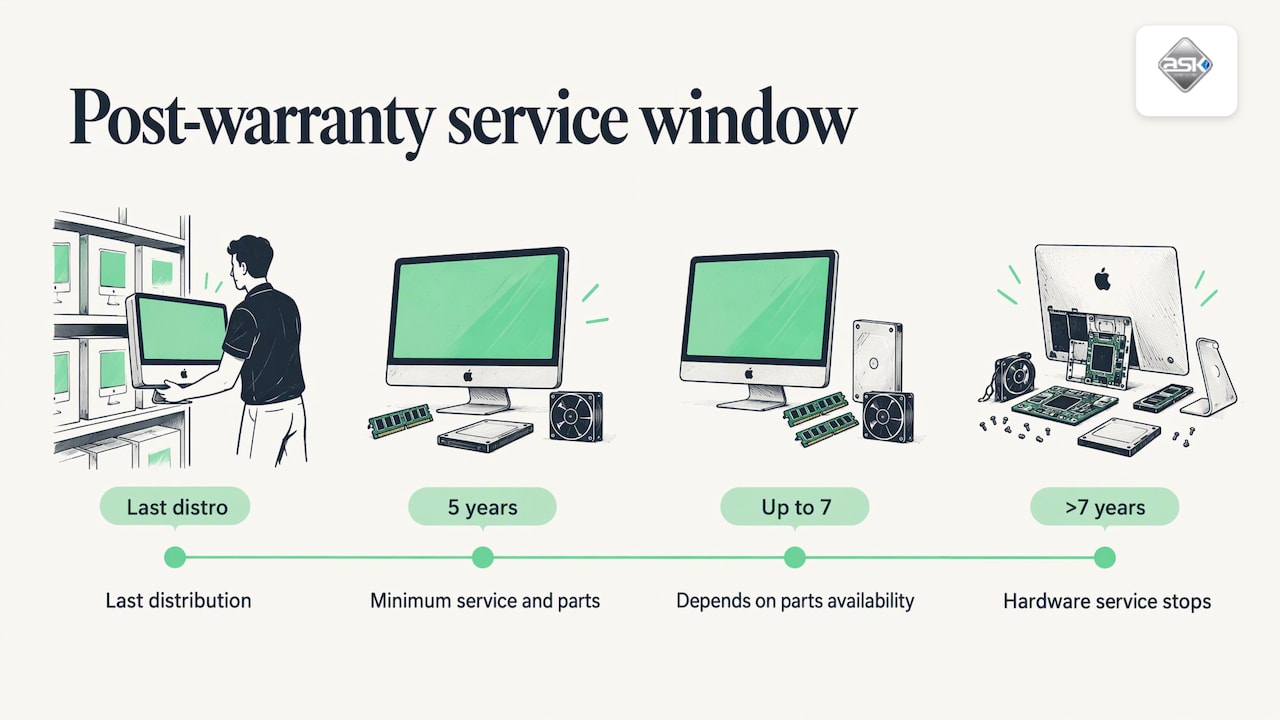
Parts availability. This is the one owners of older machines should check first. Apple’s Canadian support page on post-warranty service states that service and parts are available for a minimum of 5 years after Apple last distributed a product, and up to 7 years depending on parts availability. It lists the Retina 4K 21.5-inch (2017, 2019) and Retina 5K 27-inch (2015, 2017, 2019) iMacs as vintage, and says Apple stops all hardware service for obsolete products, meaning those no longer distributed for more than 7 years (Apple Canada, post-warranty service). Apple’s category of “vintage” and “obsolete” describes Apple’s own parts ordering. It does not decide whether your iMac can be fixed. A repair shop sources parts through its own channels, and a free estimate tells you quickly whether a display for your model can be had.
What affects the price of an iMac screen repair
We do not publish a fixed price list for iMac screens, because the honest answer depends on the machine in front of us. These are the factors that move the quote:
| Factor | Why it changes the price |
|---|---|
| Screen size | A 27-inch panel is a bigger and costlier part than a 21.5-inch one. |
| Retina or non-Retina | Higher-resolution displays are more expensive and more delicate to fit. |
| Panel or backlight fault | A failed backlight part or cable can cost less than a full display. |
| Other damage | A hit hard enough to crack the glass can also damage the board, drive or fans. |
| Part availability | Older models can need a harder-to-find display, which affects both price and turnaround. |
| Data at risk | If the iMac must be opened, you will want your files safe first. |
Prices quoted online for iMac screens vary widely, and the spread is mostly these factors: model, panel and what else is wrong. That is also why a phone quote without seeing the machine tends to move once the technician has the iMac on the bench. Bringing it in for a free estimate gets you a number tied to your actual model and fault.
Repair or replace the whole iMac?
The sensible test is not the age on its own. It is whether the rest of the computer still does what you need.
Repairing makes sense when:
- The iMac runs well apart from the screen, and your apps and macOS version still meet your needs.
- The fault is isolated to the display, its cable or the backlight.
- The iMac holds files, accounts and settings you would rather not move.
Replacing starts to make sense when:
- The machine is also slow, running out of storage or no longer receives the macOS updates your software needs, and the screen is only one of several problems.
- The estimate for a damaged, hard-to-source display on a much older model gets close to what you would put towards a newer machine.
Our own piece on whether to repair or replace a Mac goes through that decision in more depth. If a replacement is the better call, we also sell computer systems in store, so you can sort out both in one visit.
A cracked iMac screen is a particularly good repair candidate because the iMac is an expensive all-in-one: when the screen dies, the processor, memory and storage inside are usually still fine. Repair keeps all of that in use.
Before you book: protect your data and check your coverage
Your files
A display repair does not touch your drive, but the iMac is opened and moved, and a machine that has taken a hard knock can have other damage. If you can still see the screen, back up with Time Machine or copy the important folders to an external drive first. If you cannot see anything, tell us when you bring it in. We also handle data recovery and transfer for computers, so your files do not have to be the reason you put off the repair.
Warranty and AppleCare+
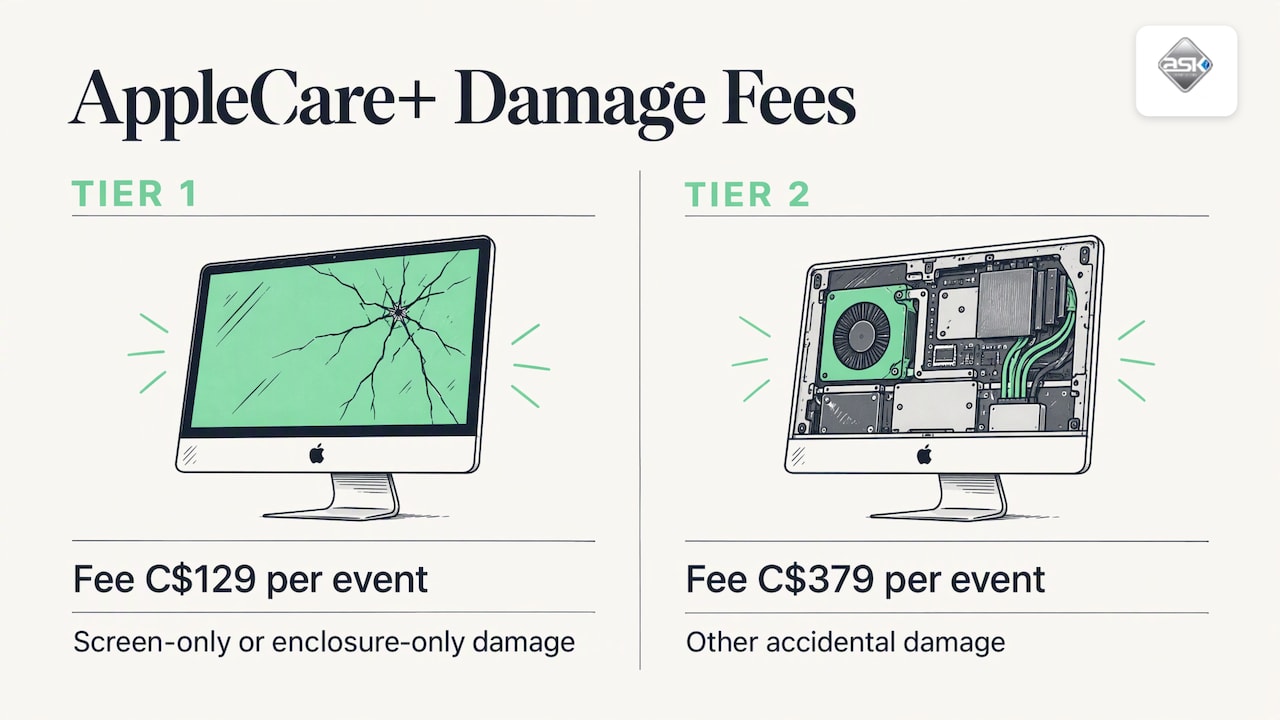
If you bought AppleCare+ for your iMac, read the terms before you pay anyone. In Canada, Apple’s terms set the accidental damage fee at C$129 per Tier 1 event for screen-only or external-enclosure-only damage, and C$379 per Tier 2 event for other accidental damage (Apple’s AppleCare+ for Mac terms, June 2023 version). The lower fee applies only if there is no additional damage. The insurer’s 2026 policy wording adds that the equipment must be returned with its original parts or Apple-authorized replacements, and that third-party parts may affect coverage (AIG Canada AppleCare+ policy wording). In practice: if your plan is active, compare its fee with a repair estimate, and keep in mind that coverage terms can be affected by who has worked on the machine.
If your iMac is out of coverage, which is the situation for most owners with a cracked screen, a repair estimate is your best next step. And Apple’s repair path is not the only way to get a screen fixed: a Toronto shop with a micro-soldering bench and walk-in service often turns a job around faster than a mail-in repair.
Turnaround
The time depends on whether the display for your model is on hand. Ask for the expected turnaround when you get your estimate, because a part that must be ordered adds days. The same goes for the question of whether other faults will turn up once the old display is off.
What happens when you bring your iMac to Ask Computers
We are a Toronto repair shop with more than 15 years of experience, and we repair Macs, MacBooks, iPhones, iPads, Windows laptops and desktops in store. For an iMac display problem, the process is simple:
- Bring it in. We accept walk-ins, and the estimate is free.
- We look at the fault. Cracked glass is easy to read. For lines, flicker or a black screen, we work out whether the display, its cable, the backlight or the logic board is responsible, so you do not pay for a part that will not cure the problem.
- You get the estimate. It covers the part and the work for your model, and you decide whether to go ahead.
- The repair. If it needs board-level work, we can do logic board micro-soldering in house, which is how we fix damaged boards instead of replacing them.
You can read about the Mac side of our work on the Mac and MacBook repair page, and if you want a broader guide to the Toronto Mac repair market, see our guide to Apple Mac repair specialists in Toronto.
If your iMac has a cracked, lined or dark screen, bring it to Ask Computers in Toronto for a free estimate. We accept walk-ins, and we will tell you what the fault is and what fixing it involves before you commit to anything.
FAQ
Can an iMac screen be repaired, or does the whole display need replacing?
It depends on the fault. A cracked panel means a new display. A dim image, lines or a black screen can sometimes come from the backlight, a cable or the logic board, which are repaired without a new panel. A free estimate identifies which one you have.
Is it worth fixing an iMac screen on an older machine?
Usually yes if the computer otherwise performs well and a display for your model can be sourced. Apple’s own service period for parts is limited, with vintage and obsolete status set by how long ago it last distributed the model (Apple Canada). A repair shop’s estimate shows whether a part is available and whether the price makes sense.
Does Apple replace a cracked iMac screen for free?
Not as a general rule. With AppleCare+ in Canada, screen-only damage carries a C$129 fee per event under Apple’s terms, and a higher C$379 fee applies when other damage is involved (Apple’s terms). Without a plan, you pay the repair price.
How long does an iMac display replacement take?
The work itself involves cutting adhesive, moving cables and sensors, and resealing the display, so it is not a five-minute job. Total time depends mostly on whether the display for your model is in stock. Ask for the turnaround when you receive your estimate.
Should I back up my iMac before the repair?
Yes, if you can see the screen well enough to do it. Time Machine or a copy of your key folders to an external drive takes the worry out of the visit. If the screen is already dark, let us know, and we can help with data transfer.
Sources
- iMac (24-inch, 2024, Two ports) Repair Manual, Apple Canada
- iMac 27″ 2017 Display Replacement, iFixit
- iMac Intel 21.5″ EMC 2805 Display Replacement, iFixit
- Obtaining service for your Apple product after an expired warranty, Apple Canada
- AppleCare+ for Mac Canada terms, Apple
- AppleCare+ for Mac policy wording, AIG Canada