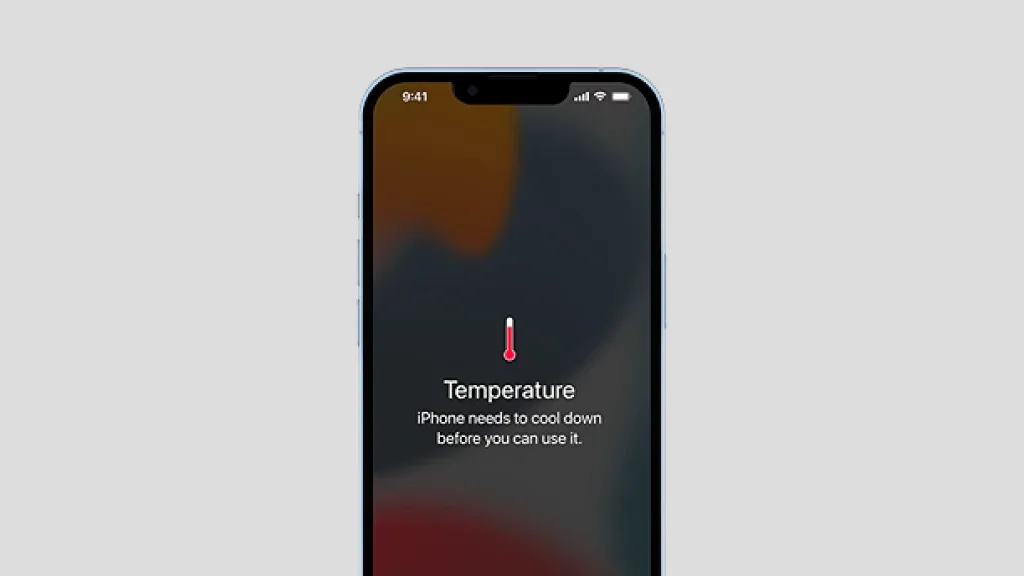
Why Is My iPhone Overheating? Common Causes, Warning Signs & Repair Options
Quick Answer: Your iPhone may overheat because of demanding apps, direct sunlight, charging conditions, background activity, or battery problems. Some warmth is normal, especially during gaming, navigation, or software updates. However, repeated overheating during light use, unexpected shutdowns, or a swelling battery could indicate a problem that requires professional attention.
Your iPhone is designed to manage heat during everyday use. Still, when your device becomes uncomfortable to hold, stops charging, or displays a temperature warning, it can be difficult to know whether the issue is temporary or serious.
If you’re wondering, “Why is my iPhone overheating?” the answer depends on when it happens, what you’re doing, and whether the phone has experienced physical or liquid damage.
This guide explains the common causes of iPhone overheating, safe ways to cool your device, and when to consider professional repair.
Is It Normal for an iPhone to Get Hot?
Yes, an iPhone can become warm during certain activities without having a hardware problem.
For example, you may notice increased warmth when:
- Setting up a new iPhone or restoring data from a backup.
- Playing graphics-intensive mobile games.
- Recording high-resolution videos.
- Using GPS navigation for an extended period.
- Installing a major iOS update.
- Charging while running demanding applications.
The difference between normal warmth and problematic overheating is how the phone behaves afterward.
If your iPhone cools down once an intensive task ends, it may be operating normally. However, if it repeatedly becomes very hot while idle or performing simple activities, further investigation is worthwhile.
7 Common Reasons Your iPhone Is Overheating
1. Too Many Background Processes
Even when you’re not actively using an application, certain background activities can consume processing power.
Photo syncing, app updates, cloud backups, and other tasks may contribute to your iPhone heating up.
Open Settings > Battery to review which applications have been consuming battery power. If one app consistently uses unusually high amounts of power, consider updating it or adjusting its background activity.
2. Battery Age or Deterioration
Rechargeable batteries naturally lose capacity as they age.
A deteriorating battery may contribute to unusual performance, unexpected shutdowns, and charging problems. However, heat alone does not prove that a battery is defective.
If your phone gets hot while experiencing rapid battery drain, read our guide on why your iPhone battery is draining fast.
You can also check battery health under Settings > Battery > Battery Health, although menu names vary by iPhone model and iOS version.
If testing confirms that the battery needs replacement, professional iPhone battery replacement in Toronto may help restore reliable operation.
3. Charging Accessories or Charging Conditions
Charging generates heat, and wireless charging can produce additional warmth.
If your iPhone gets unusually hot while charging, check the cable, power adapter, and surrounding environment.
Avoid charging under blankets, pillows, or other objects that trap heat.
If the device repeatedly overheats with different compatible chargers, its battery or charging hardware may require inspection.
4. Direct Sunlight and High Temperatures
Using an iPhone in direct sunlight can raise its internal temperature quickly.
Common situations include leaving a phone on a vehicle dashboard, using navigation near a sunny windshield, or taking photos outdoors on a hot day.
Apple specifies an ambient operating range of 0°C to 35°C for iPhone.
Move the phone into a cooler, shaded environment if it becomes excessively hot.
5. Software Updates and Temporary Processing
An iPhone overheating after an update does not necessarily mean that the update damaged the device.
Following major software changes, an iPhone may perform background processing, indexing, and synchronization.
These activities can temporarily increase power consumption.
If overheating continues long after the update finishes, inspect battery usage and check for additional software updates.
6. Demanding Apps and Gaming
Video editing, augmented reality, video calls, and high-performance games place additional demand on the processor and graphics system.
Using these applications while charging can increase heat further.
Reduce screen brightness, close the demanding activity, and give the device time to cool.
7. Internal Hardware or Liquid Damage
A damaged battery, charging component, or internal circuit can potentially cause abnormal heat generation.
Consider professional inspection if the problem began after your iPhone was dropped, exposed to liquid, or repaired.
A technician can investigate whether the heat is caused by the battery, charging circuit, or another component rather than assuming that every overheating problem requires battery replacement.
Warning Signs That Your iPhone Needs Attention
| Symptom | What it could indicate |
|---|---|
| iPhone gets hot during gaming | Heavy processing or environmental heat |
| Phone becomes unusually hot while idle | Background activity or possible hardware fault |
| Charging repeatedly pauses | Temperature protection or charging problem |
| Battery drains quickly and device gets hot | High power consumption or battery deterioration |
| Phone shuts down unexpectedly | Temperature protection, battery, or another fault |
| Screen begins lifting or battery appears swollen | Possible battery safety issue requiring immediate attention |
If your iPhone displays a temperature warning, stop using it temporarily and allow it to cool in a shaded location.
If the battery appears swollen, the device emits smoke, or there is a burning smell, stop charging and using it. Do not attempt to open or press the device. Seek qualified repair assistance.
How to Stop an iPhone From Overheating
Start with these practical troubleshooting steps:
- Move the iPhone away from heat. Place it somewhere shaded with normal room-temperature airflow.
- Stop demanding activities. Pause gaming, recording, navigation, or other intensive tasks.
- Disconnect charging accessories. If charging is contributing to the heat, disconnect the charger and allow the phone to cool.
- Remove a heat-trapping case temporarily. This may help the phone release heat more easily.
- Check battery usage. Review whether a specific application is consuming excessive power.
- Update iOS and applications. Software fixes may resolve some performance-related problems.
- Restart the device once it has cooled. This may clear a temporary software issue.
Never put your iPhone in a freezer or refrigerator to cool it down. Sudden temperature changes and condensation can damage electronics.
When Should You Get Your iPhone Checked?
If your iPhone repeatedly overheats while performing basic tasks, becomes excessively hot during charging, or shows other unusual symptoms, a professional diagnosis can help identify the cause.
At Ask Computers, our technicians can assess battery condition and other possible hardware problems before recommending an appropriate repair.
Get Your iPhone Checked at Ask Computers
Visit our downtown Toronto repair shop for an assessment of your overheating iPhone.
Can Replacing an iPhone Battery Fix Overheating?
It can, but only when the battery is contributing to the problem.
Replacing a battery will not necessarily fix overheating caused by a demanding application, environmental conditions, a charging circuit fault, or internal board damage.
The most effective approach is to identify the reason for the heat before selecting a replacement part.
Ask Computers provides phone battery replacement services and broader iPhone repair services in Toronto for devices with battery and hardware-related issues.
How to Prevent Your iPhone From Overheating Again
Preventive habits can help reduce unnecessary heat and protect long-term battery performance.
Avoid exposing your device to direct sunlight for extended periods. Use suitable charging accessories, keep iOS updated, and monitor applications that consume excessive power.
If the device frequently heats up during charging, investigate the issue instead of ignoring it.
Most importantly, don’t assume that an unusually hot phone is simply part of normal ageing.
Frequently Asked Questions About iPhone Overheating
Why is my iPhone overheating when I’m not using it?
Your iPhone may still be syncing photos, updating apps, or performing background processing. If excessive heat persists while the phone is idle, battery or hardware issues may also be involved.
Why does my iPhone get hot while charging?
Charging naturally generates warmth. However, extreme heat can be associated with poor ventilation, demanding activity while charging, charging accessories, or hardware problems.
Can iPhone overheating damage the battery?
Repeated exposure to high temperatures can accelerate battery ageing and reduce its long-term performance.
Why is my iPhone overheating after an iOS update?
Background activity following an update can temporarily increase processing demands. Persistent overheating should be investigated rather than automatically attributed to the update.
How do I cool down my iPhone quickly?
Stop demanding applications, disconnect charging if appropriate, move the phone out of direct sunlight, and allow it to cool naturally. Avoid ice, refrigeration, or water.
Should I replace my iPhone if it keeps overheating?
Not necessarily. Depending on the cause, a battery or other repair may resolve the problem without replacing the entire device.
Get Professional iPhone Overheating Diagnostics in Toronto
If your iPhone continues to overheat despite basic troubleshooting, don’t ignore the warning signs.
Ask Computers provides professional iPhone repair in Toronto, including battery replacement and investigation of hardware-related issues.
Visit Ask Computers at 111 Front St E, Toronto, ON, or call (416) 862-9595 to discuss your device.